
Huntr Blog
Huntr vs ResumeUp: Which Resume Tool Is Best in 2026?
February 11, 2026

Choosing between Huntr vs. ResumeUp comes down to how much support you want from your resume builder and how much effort you are willing to put in. Both are AI-powered resume builders that promise ATS-friendly output, but they approach the job search very differently. This review breaks down where each tool actually performs well in real use, so job seekers can decide which option helps them move faster and avoid common frustrations.
Quick Verdict
If you are searching “huntr vs resumeup” because you want the safest resume builder with the fewest surprises, Huntr is the better pick for most job seekers. It is strong at tailoring to a job description, it helps with skills, and it lets you export a professional resume without hitting a paywall. That combination matters because you can actually finish the work without getting pushed into premium features just to download.
ResumeUp is better if your priority is resume templates and you are comfortable guiding the AI resume builder with clear prompts. When you prompt it correctly, the rewrite output can be solid, but it is less forgiving. You should expect more manual correction and a bit more vigilance around accuracy and consistency.
Ultimately, Huntr tends to produce higher resume quality with less effort, plus it is easier to complete an ATS-friendly workflow end-to-end on a free plan. ResumeUp can work well for writers who like template variety and do not mind steering the AI, but the value for money depends on whether you are willing to pay and manage the extra friction.
What Each Tool Is Designed to Do
Most reviews jump into feature lists, but intent matters more. These tools overlap on paper, yet they are built for different parts of the job search process. One behaves like an application system with a resume builder inside it. The other behaves like a resume-first tool that adds job hunting features around the edges.
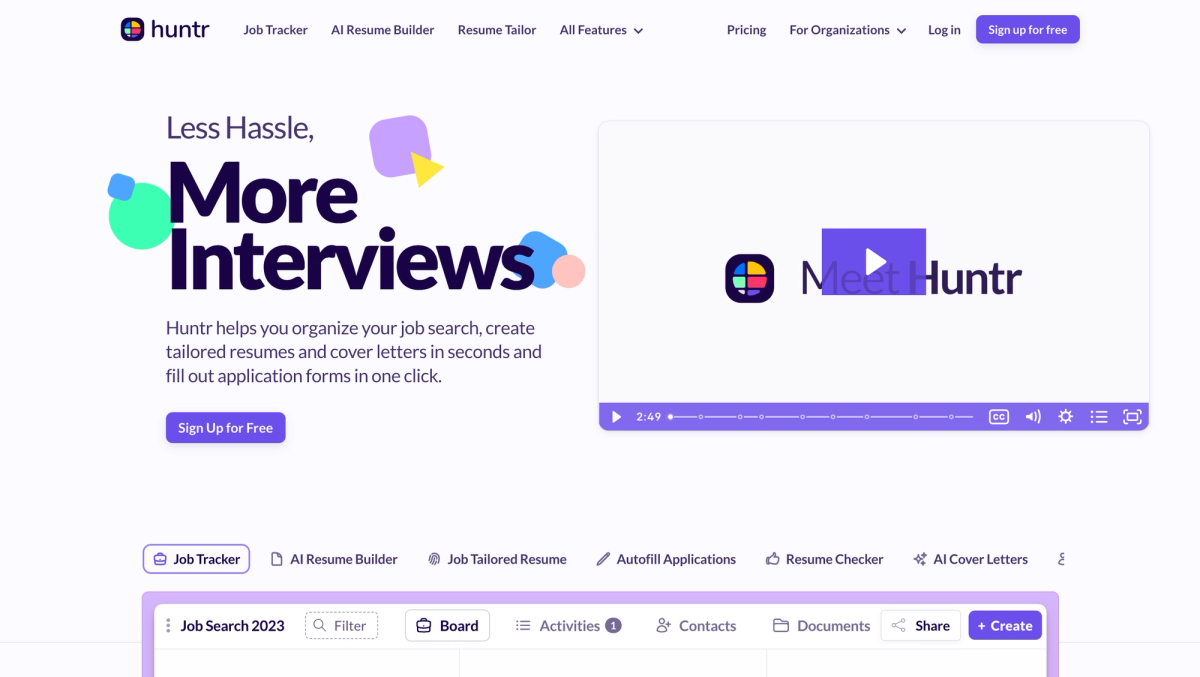
Huntr’s Core Focus
Huntr is built around the whole process of applying. The resume builder is designed to plug into job applications with a job-tracking workflow that lets you iterate quickly across roles. That shows up in how it treats job descriptions and how it supports tailoring, which is the hard part for people actively job hunting.
It also tends to work well without you having to babysit every step. You can use the AI assistant for resume edits, then move into cover letter generation and other steps without rebuilding your workflow each time. If you are applying at volume, the system feel matters.
ResumeUp’s Core Focus
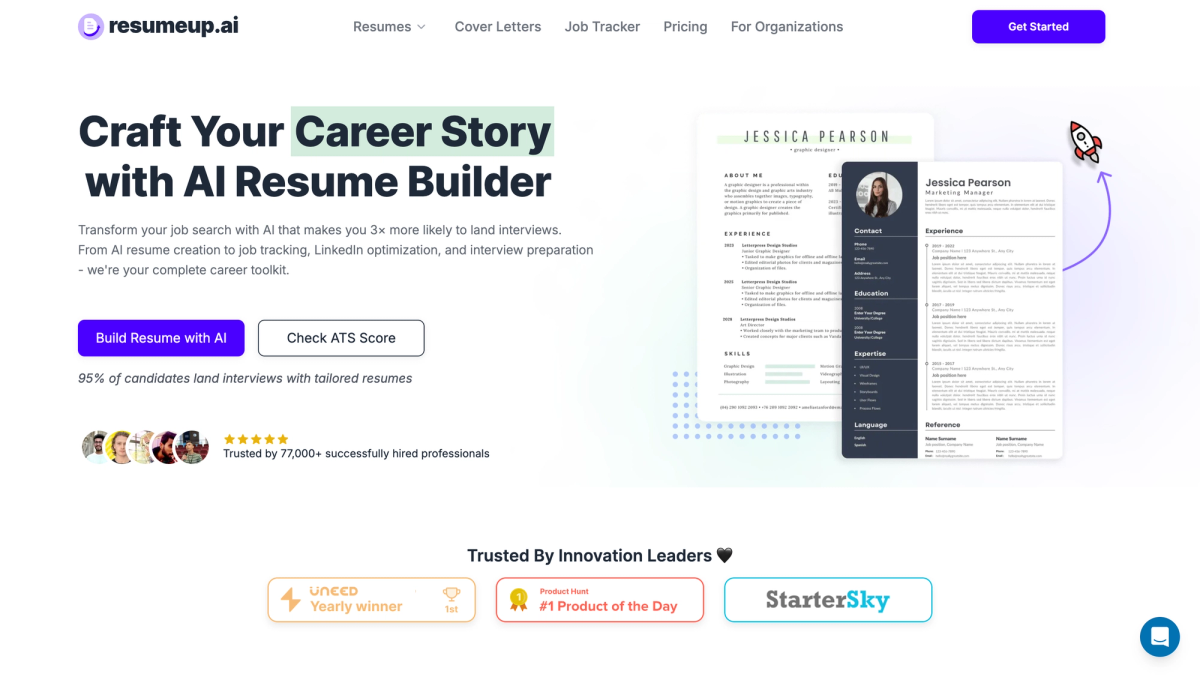
ResumeUp leans resume-first. It prioritizes resume templates, formatting, and scoring so you can shape resume content fast. It suits people who like controlling the resume-writing process, including choosing what style to keep and what to rewrite.
The tradeoff is that the AI resume output depends more on user input. If you know what you want, it can be a productive way to craft a strong resume. If you want the tool to carry more of the load, it can feel less straightforward.
How We Tested Huntr vs ResumeUp
We tested Huntr vs. ResumeUp using the same rubric we use across AI resume builders in our larger dataset. The flow was consistent: sign up, import, edit, rewrite, tailor, score or check, then export. That matters because many tools look similar until you actually try to finish a resume.
We scored editor UX, template quality, AI writing reliability, tailoring depth, scoring usefulness, export access, and pricing transparency. Recruiters and hiring trends reward speed and accuracy, so we care less about marketing claims and more about whether the tool helps you ship an ATS-friendly resume you would feel confident sending.
Resume Creation Experience
This is where most people make a decision. A resume builder can claim a lot, but you feel the difference when you are turning work experience into a clean first draft, then adjusting it for specific roles.
Getting Started: Speed vs Structure
Huntr is quick to get to a usable draft, especially if you import from a LinkedIn profile or upload an existing resume. The import tends to extract common sections cleanly, which reduces time spent fixing formatting and rebuilding entries.
ResumeUp also supports import, and the onboarding can feel straightforward, but you may spend more time steering how content lands in the template. If you have a clear job title target and a solid base resume, that is manageable. If your source resume is messy, you may feel more cleanup work.
Templates, Formatting, and ATS Readiness
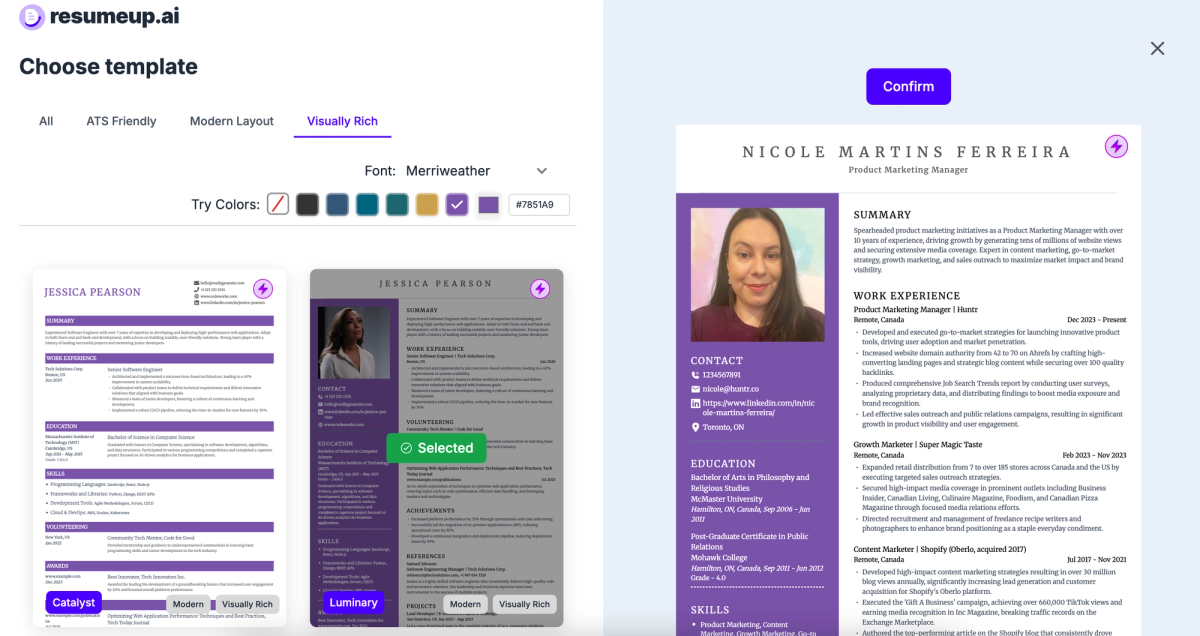
ResumeUp has more resume templates, and that is the main reason someone chooses it. The designs are generally professional and readable, and customization options like colors and fonts can help the resume feel polished. That said, template count is not the same as practical usability. What matters is whether the layout stays clean under edits, especially for longer work experience sections.
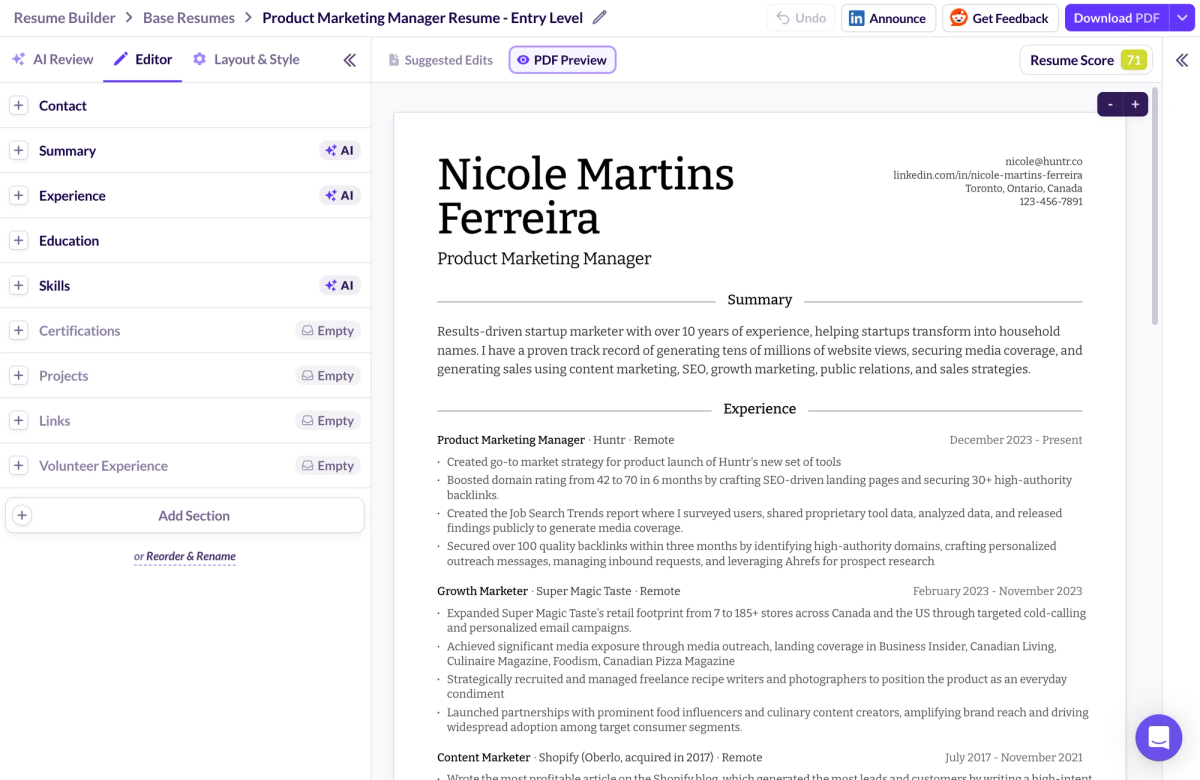
Huntr has fewer templates, but it focuses on modern, ATS-friendly resumes with strong formatting control. The ability to adjust spacing, margins, date formats, and section layout matters for applicant tracking systems and for screening resumes quickly. For most roles, that kind of control beats browsing through twenty designs you will never use.
AI Writing and Resume Assistance
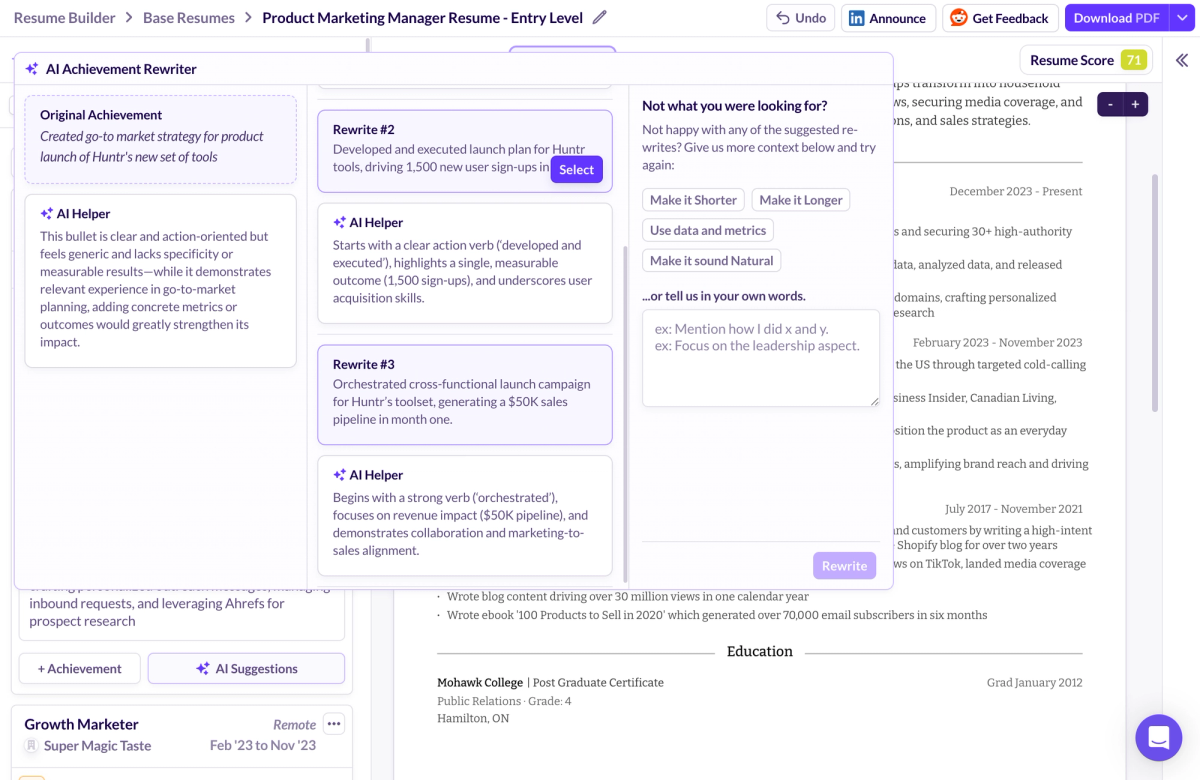
Huntr’s AI features are strongest when you are rewriting bullets in a way that fits a job description. It tends to produce usable suggestions without needing elaborate prompting, and it is good at improving clarity while keeping the core message intact. That is what most job seekers need: better bullet points and the right words, fast.
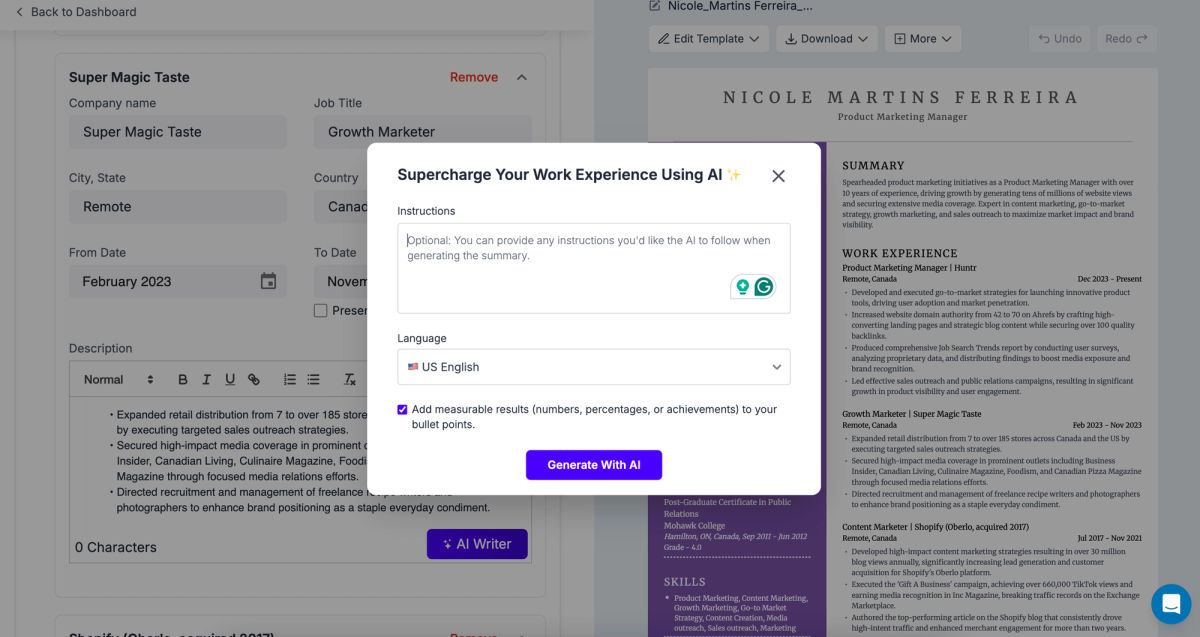
ResumeUp can deliver strong rewrites, but it is more prompt-dependent. If you give vague instructions, output quality varies. If you guide the AI carefully, it can preserve quantifiable achievements and improve phrasing. The tradeoff is effort. Huntr usually asks less of you to get something resume-ready.
Skills Workflow: Auto Suggestions vs Manual Entry
Skills are where many tools fall apart. Huntr is stronger here because it supports skill suggestions and keyword guidance that align with job descriptions. That helps you build a skills section without guessing, and it supports keyword optimization without turning your resume into a buzzword list.
ResumeUp can require more manual work to build the skills section. If you already know your relevant skills and industry-specific keywords, that is fine. If you want the tool to surface right keywords for you, it can feel like unnecessary extra steps.
Resume Optimization and Feedback Quality
This is the part that separates a pretty resume from a resume that performs. The question is whether the resume checker and ATS check outputs are actionable, and whether they help you improve outcomes with recruiters.
Resume Scoring and Feedback Depth
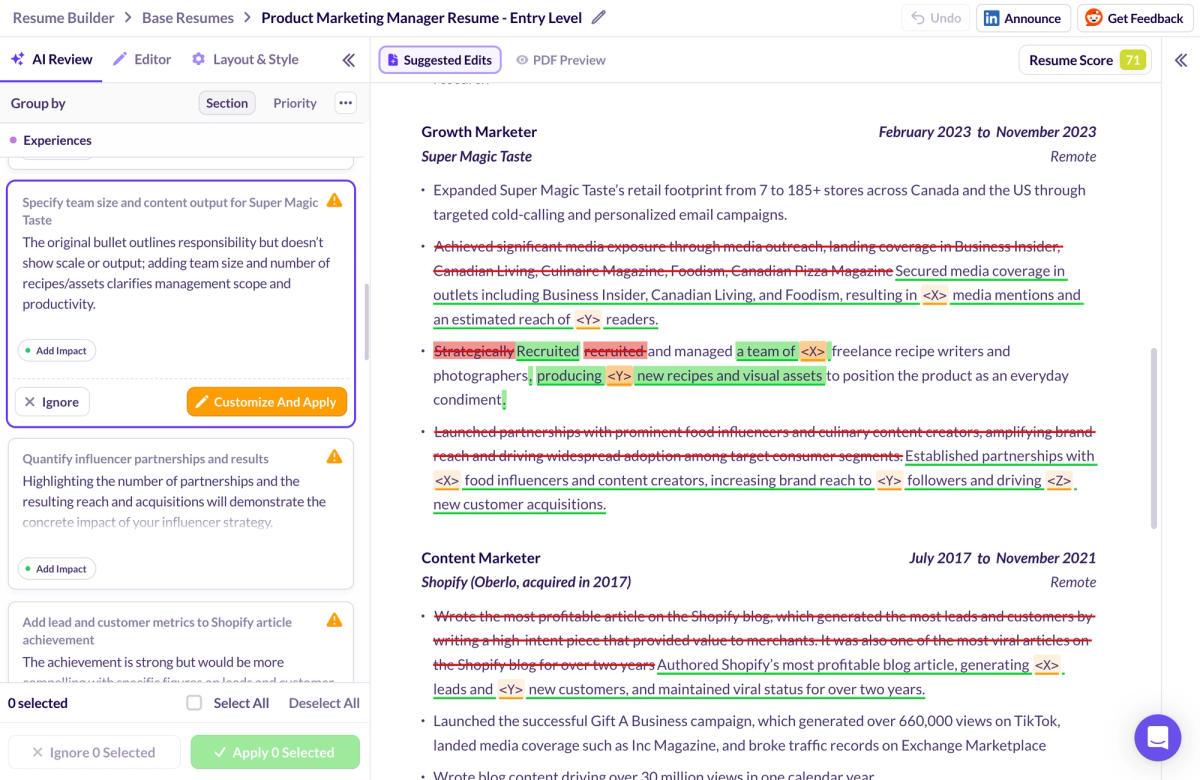
Both tools offer scoring but treat scores as signals instead of verdicts. A resume checker can flag missing sections, weak bullets, or formatting issues that may trip ATS filters. The best feedback explains why a change matters and what to do next, not just a number.
If you see extremely high scores, stay skeptical. Hiring managers do not hire scores. They screen for clarity, fit, and evidence. A high ATS check should trigger a quick review to confirm the tool did not reward fluff.
Tailoring for Specific Job Descriptions
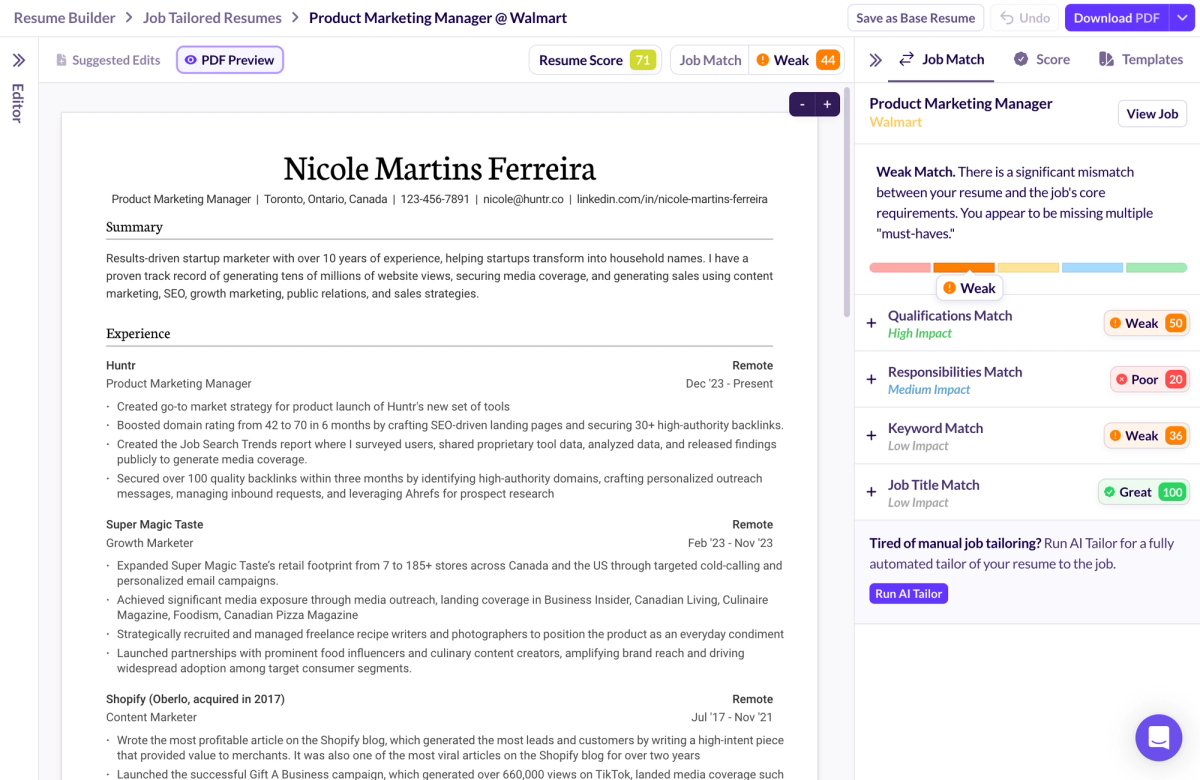
Huntr is stronger when you need multiple tailored versions. The workflow supports creating role-specific resumes without starting over, and it tends to go beyond keyword surfacing into deeper rewrites. That matters for landing interviews because most resumes fail on relevance, not on grammar.
ResumeUp supports tailoring as well, but it leans more toward suggestions and keyword targeting. It can work, but it is more likely you will be selecting and editing outputs rather than letting the system guide you through a repeatable process.
AI Reliability Metrics, Hallucinations, and Consistency
AI resume tools can improve writing, but they can also invent details. The key is how often they preserve your real accomplishments and how easy it is to catch problems. You should review any generated bullet points, especially anything that adds percentages, growth claims, or timelines you cannot defend.
Huntr tends to be more consistent out of the box, though you still need oversight. ResumeUp can be accurate with the right prompt, but it is easier for the AI to drift when instructions are vague. If you care about credibility, prioritize a workflow that keeps quantifiable achievements intact and makes edits transparent.
Job Application and Tracking Capabilities
This section matters after resume intent because job applications are where friction compounds. A good job tracker and job tracking system reduce missed follow-ups and help you move faster during job hunting.
Job Tracking Workflows
Huntr feels built around job tracking. The job tracker is visual and encourages a pipeline mindset that matches the job search process. Resumes connect naturally to job cards and job postings, so tailoring stays tied to what you are applying to.
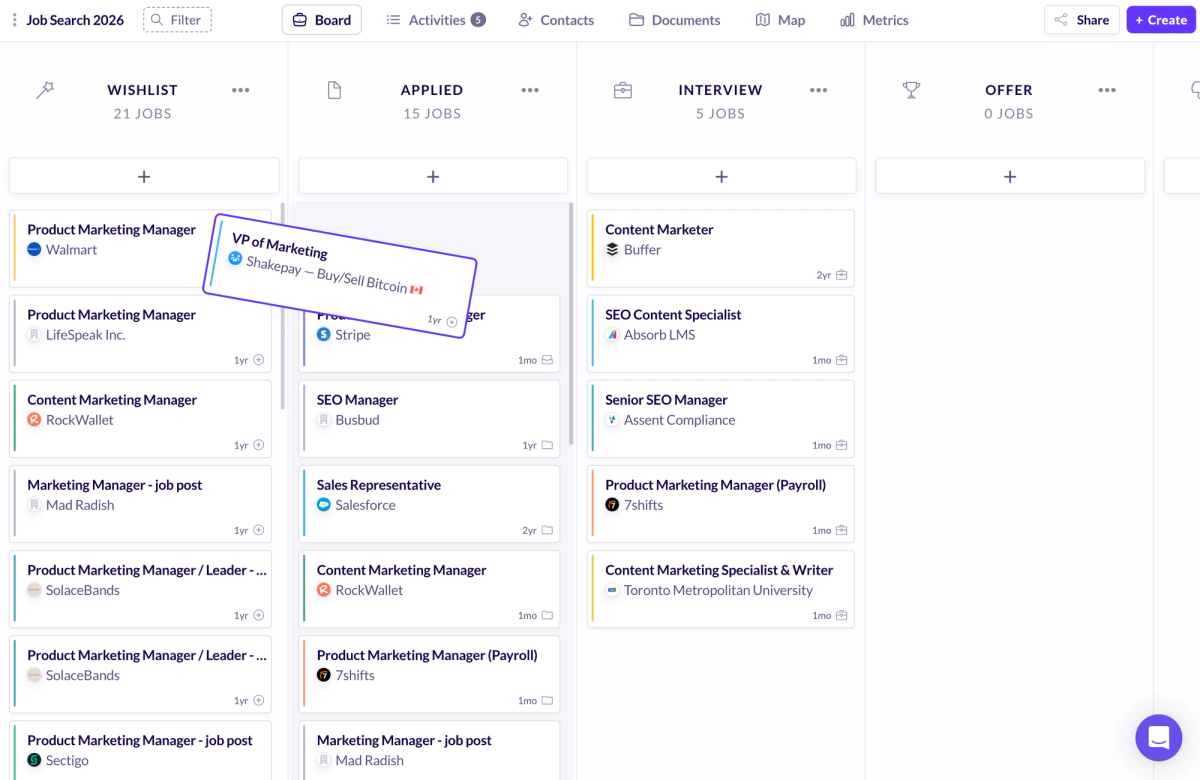
ResumeUp includes job tracking features, but the experience is more resume-first. The connection between the resume builder and the tracking flow can feel less central, depending on how you use the platform.
Browser Extensions and Autofill
Autofill tools can be a time-saver if you apply at scale. The reality is mixed. It works best on standard forms and common fields, and it struggles more on complex application systems.
Huntr’s tooling tends to fit people who want to apply quickly and keep records without manual entry. ResumeUp’s extension can be useful, but it is rarely the reason to choose it over a better overall workflow.
Staying Organized During an Active Job Search
If you are actively job hunting, organization is leverage. Reminders, notes, and follow-ups matter because small misses add up. Huntr scales better for high-volume job applications because tracking and iteration are core to the product. ResumeUp can support organization, but it is not as clearly optimized for managing a large pipeline.
Ease of Use and Overall Experience
Features matter less if the tool is slow or annoying. UX determines whether you stick with a system long enough to benefit from it.
Interface and Navigation
Huntr is designed to reduce cognitive load during editing. Small details like formatting control, section editing, and undo shape your speed. If a tool makes you fight the layout, you waste time.
ResumeUp can feel clean and template-forward, but the experience depends more on how you interact with the AI and the editor. If you like selecting from options and refining, you may enjoy it. If you want fewer decisions per edit, Huntr tends to feel more direct.
Best Tool for Different Experience Levels
For early-career job seekers, the best tool is the one that helps you produce a strong resume without requiring expertise. Huntr is usually easier to use without knowing how recruiters think, because the system nudges you through practical steps.
For mid-career professionals and career switchers, tailoring and credibility become more important than design variety. Both can work, but Huntr’s workflow is more forgiving when you need multiple versions and want fewer surprises. International considerations like photos and formatting can matter, and both tools can support that depending on template choice.
Pricing, Plans, and Value for Money
Pricing is where many resume tools disappoint. The question is whether you can finish a resume without getting pushed into an upgrade for basic outputs.
Free Plan Comparison
Huntr has a clear advantage for people who want a free version that still lets you export a resume. Being able to download without paying changes the entire value equation, especially for job seekers who are testing tools or working with a tight budget.
ResumeUp generally requires payment to get full utility and export, so the free plan experience is more limited. If you already know you want the templates and are fine paying, that is a different calculation. For most people comparing Huntr vs. ResumeUp, the ability to finish without surprises matters more.
Paid Plans Comparison
Paid plans make sense when they unlock meaningful improvements, not cosmetic extras. If you are resume-only and want occasional rewrites, paying for a month can be reasonable. If you are applying frequently and tailoring constantly, value comes from reducing time and raising consistency.
Huntr’s premium features tend to map to high-frequency job seekers. ResumeUp’s premium features tend to make sense for users who prioritize templates and scoring, and who will actually use the AI features with careful prompting.
Cost vs Feature Tradeoffs
Higher price does not automatically mean better. The best value is the tool that reduces effort while improving results. If a free plan gets you to a professional resume you can export, that often beats a paid tool with extra features you will not use. If you care about design variety and are willing to pay, ResumeUp can be acceptable. If you care about repeatable output with fewer headaches, Huntr is the safer pick.
Trust, Data, and Pricing Transparency
The resume space has more dark patterns than most categories of tools. That is why trust signals and pricing transparency deserve their own section.
Free Claims vs Real Access
“Free” often means you can type, but cannot download, or you can start, but cannot complete. Before you commit time or data, check whether the resume builder supports export and what limits apply. For job seekers, time loss is the hidden cost.
Paywalls, Checkout Gotchas, and Subscription Traps
Watch for pricing pages that hide critical limits, and checkout flows that blur one-time payment with recurring subscriptions. Look for clear language around billed monthly terms and renewal timing. If a tool is vague here, that is a red flag.
Cancellation and Account Control
Short job searches are common, which makes cancellation friction matter. If you have to contact support to cancel instead of using a self-serve setting, that is a negative. You want control over your account and plan, especially when you are switching tools during the whole process.
Trust Signals That Matter
The best trust signal is finishing the work cleanly. Clear plan limits, straightforward exporting, and no surprises matter more than marketing claims about ATS-friendly resumes. If recruiters and hiring managers will judge your document in seconds, you should choose a tool that helps you deliver that document without ambiguity.
Pros and Cons at a Glance
Huntr Pros and Cons (Resume-Focused)
Huntr’s main strengths are breadth, reliability, and free access that lets you export. It supports a job tracker workflow, connects well to job descriptions, and handles tailoring and skills without demanding constant intervention. The main limitation is template count. If you want endless visual options, it is more limited than template-heavy tools.
ResumeUp Pros and Cons
ResumeUp’s main strength is template variety and the ability to generate strong rewrites when you guide it carefully. It can help refine resume content, but it asks more from the user. Limitations include paid-only access for full use, more manual effort in areas like skills, and less forgiving AI behavior if prompts are weak.
Which Tool Should Most Job Seekers Choose?
For most job seekers comparing Huntr vs. ResumeUp, Huntr is the better default. It is easier to produce an ATS-friendly resume, tailor it to a job description, and export it without friction. That matters whether you are resume-only or deep into job applications.
Choose ResumeUp if you care most about resume templates and you are comfortable managing the AI through clear prompts and manual review. It can be a reasonable option when you have specific formatting preferences and you do not mind the extra effort.
However, if you are applying to many roles, or you want a system that helps you stay organized while landing interviews, Huntr is the safer choice.
Conclusion
In this Huntr vs ResumeUp comparison, Huntr is the better resume builder for most job seekers because it combines reliable AI help with a system that supports the job search end-to-end, and it lets you export without getting boxed into a paid upgrade at the finish line. ResumeUp can still be a reasonable option if you care most about template variety and you are comfortable managing prompts and reviewing every change for accuracy. If you want the best AI tools to feel like leverage instead of another project to manage, choose the option that helps you finish faster, stay credible, and avoid overpaying for features you will not use. Try Huntr for free and build a resume you can tailor and export today.
FAQs
Is Huntr better than ResumeUp for resumes or job applications?
Huntr is usually better for the combined workflow because the resume builder, tailoring, and job tracking are more integrated. ResumeUp is more resume-first, which can work if you only care about building the document and are fine with managing the process elsewhere.
Which tool is more ATS-friendly in 2026?
Both can produce ATS-friendly resumes if you choose clean templates and keep formatting simple. The bigger difference is consistency and workflow. Huntr makes it easier to keep structure stable while tailoring. ResumeUp can be ATS-friendly, but treat scoring as guidance and verify content accuracy.
Can I use Huntr or ResumeUp for free?
Huntr is more usable on a free plan because you can build and export without immediate paywalls. ResumeUp generally requires payment for full access and exporting, so the free version is more of a preview than a complete solution.
Which is better for creating multiple resume versions?
Huntr is better for creating multiple tailored versions tied to job descriptions, especially if you are applying often. ResumeUp can create versions too, but it is more manual and prompt-driven.
Is either tool worth paying for if I only need a resume?
Paying can be worth it if it saves time and improves quality. If you only need one resume and want to avoid cost, Huntr’s free exporting is hard to beat. If you want a specific template style and will use the rewriting tools carefully, a short paid period on ResumeUp can make sense.
How do I avoid resume builder subscription traps?
Before entering payment details, confirm whether you are buying a monthly plan or a one-time payment, check the renewal terms, and verify cancellation steps. If exporting is paywalled, decide that upfront so you do not rebuild your resume in a tool you will abandon at checkout.

Ashliana Spence
Ashliana is a freelance marketing and growth operations consultant who works with lean teams to improve where and how they show up, communicate, and operate. With a background in integrated marketing communications, she focuses on messaging, content, systems, and processes, turning complex ideas and values into clear narratives and building workflows that help teams move with consistency and intent to support long-term trust-driven growth.
Get More Interviews, Faster
Huntr streamlines your job search. Instantly craft tailored resumes and cover letters, fill out application forms with a single click, effortlessly keep your job hunt organized, and much more...
AI Resume Builder
Beautiful, perfectly job-tailored resumes designed to make you stand out, built 10x faster with the power of AI.
Next-Generation Job Tailored Resumes
Huntr provides the most advanced job <> resume matching system in the world. Helping you match not only keywords, but responsibilities and qualifications from a job, into your resume.
Job Keyword Extractor + Resume AI Integration
Huntr extracts keywords from job descriptions and helps you integrate them into your resume using the power of AI.
Application Autofill
Save hours of mindless form filling. Use our chrome extension to fill application forms with a single click.
Job Tracker
Move beyond basic, bare-bones job trackers. Elevate your search with Huntr's all-in-one, feature-rich management platform.
AI Cover Letters
Perfectly tailored cover letters, in seconds! Our cover letter generator blends your unique background with the job's specific requirements, resulting in unique, standout cover letters.
Resume Checker
Huntr checks your resume for spelling, length, impactful use of metrics, repetition and more, ensuring your resume gets noticed by employers.
Gorgeous Resume Templates
Stand out with one of 7 designer-grade templates. Whether you're a creative spirit or a corporate professional, our range of templates caters to every career aspiration.
Personal Job Search CRM
The ultimate companion for managing your professional job-search contacts and organizing your job search outreach.
Huntr
Blog Product Updates Resume Skill Guides Resume Examples Interview Question Guides Research 2025 Job Search Trends Report Affiliate Program Careers Privacy policy Terms of service Write for us LinkedIn Reddit r/HuntrCo Twitter @TryHuntr Email UsProduct
Job Tracker AI Resume Builder Resume Tailor Resume Checker AI Cover Letters Resume Summary Generator Resume Bullet Generator Resume Skills Generator Resume Headline Generator Resume Keyword Scanner Job Keyword Finder Targeted Resume Contact Tracker Interview Tracker Job Search Metrics Job Application Autofill Resume Storage AI Resume Review Job Clipper Resume Optimization ChatGPT Resume Builder Resume Fixer LinkedIn Resume Builder AI Resume Rewriter Interview Question Generator